
A lecture note taker should reduce friction, not replace thinking
Use AI to capture lectures faster, but use retrieval practice to make the material stick.
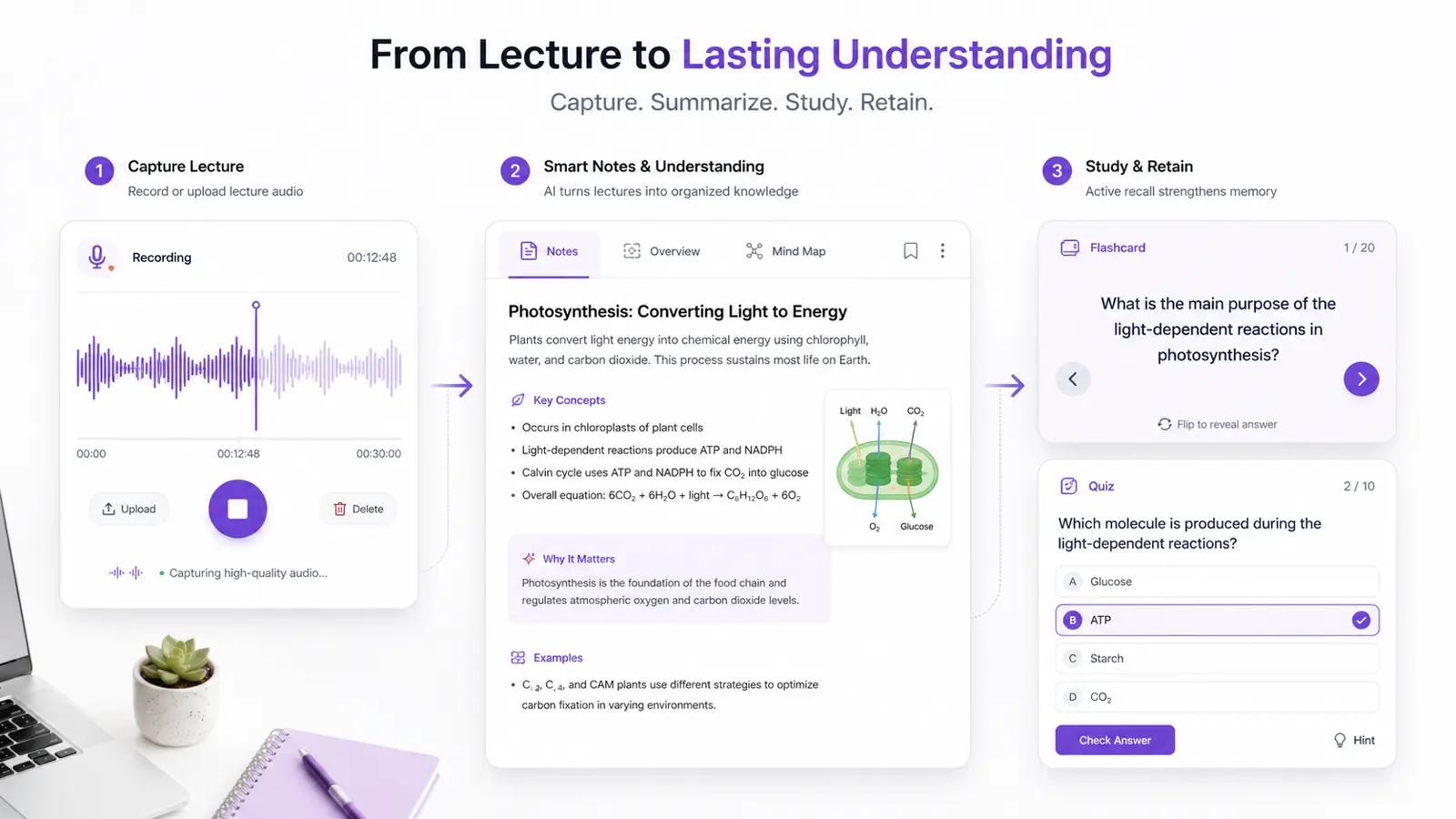
The core problem is not missing words. It is ending with notes you never use.
Most students judge a lecture session by how complete their notes look. That is a bad metric. Clean notes can still represent shallow processing if all you did was transcribe what the lecturer said. The real question is whether your notes leave you better prepared to explain, recall, and apply the material later.
This is where an AI lecture note taker can help, but only if it is used for the right job. Its highest-value role is first-pass capture. It should reduce the administrative burden of collecting the lecture, especially when the speaker moves quickly or the ideas are dense. It should not become a reason to postpone real learning until some vague future date.
Research on note-taking and learning keeps pointing in the same direction: generative processing matters more than raw volume. A useful note system forces selection, paraphrase, and reorganization. If AI gives you a cleaner capture layer, that is helpful only if you use the saved time to do those harder steps yourself.
Good lecture notes compress structure first and details second
After a lecture, most students need three things: the main claims, the supporting examples, and the vocabulary that is likely to show up on an assessment. A strong AI note workflow should surface those layers quickly. If it cannot distinguish between a central concept and an offhand anecdote, it is not saving much time.
The useful move is to treat AI notes as a draft. Start by checking whether the notes capture the lecture's structure: what question was being answered, what models or frameworks were introduced, and what distinctions matter. Only after that should you worry about polishing individual sentences or expanding minor details.
That approach matters because lecture capture can create a false sense of security. One higher-education study found that lecture capture viewing did not compensate for low attendance and engagement. In other words, recording is not a substitute for active learning. The same logic applies to AI notes: capture is not the same thing as understanding.
The learning gain happens when you turn notes into retrieval prompts within 24 hours
The strongest evidence-backed part of this workflow is not the capture step. It is the testing step that follows. Research on practice testing and retrieval practice is consistently much stronger than the case for rereading or passive review. If you finish a lecture with well-formatted notes but never use them to generate questions, you are stopping before the most useful part.
A practical rule is to convert the lecture into a small set of retrieval prompts within one day. Write questions that force you to explain mechanisms, compare concepts, define terms in your own words, or apply an example from class. If the lecture introduced a model, ask what problem it solves and when it fails. If it introduced a process, ask for the steps without looking.
This is where Brainote-style workflows make sense: lecture capture should feed directly into flashcards, quizzes, or daily review blocks. The purpose of AI is not to produce prettier notes. It is to shorten the path from messy lecture input to active recall.
A realistic lecture workflow for busy students
The most sustainable workflow is simple. Capture the lecture. Review the summary for structure. Extract the five to ten ideas most likely to matter later. Then convert those into prompts you can answer without looking.
Students often overbuild this step and burn time formatting folders, headings, and highlight colors. Resist that urge. The notes only need to be organized enough to support testing. If the system looks impressive but does not lead to recall, it is overhead.
- Use AI notes as a first-pass capture, not as the final study artifact.
- Check for structure first: topic, framework, examples, and likely testable distinctions.
- Create a short question set within 24 hours while the lecture is still fresh.
- Review those questions the next day instead of rereading the full notes.
FAQ
Can an AI lecture note taker replace attending or paying attention in class?
No. Capture tools reduce note-taking friction, but they do not replace the generative work of selecting, explaining, and testing yourself on the material.
What is the biggest mistake students make with AI lecture notes?
Treating the exported notes as the finished product. The notes should become questions, flashcards, or a short review deck, otherwise the workflow stays passive.
How many lecture questions should I create after class?
Usually five to ten high-yield prompts are enough for a first pass. Focus on definitions, contrasts, mechanisms, and examples that are likely to matter on an exam.
The Best AI Lecture Note Taker for College Students: What Actually Helps You Learn?
A research-backed guide to using an AI lecture note taker without turning studying into passive transcript collection.